How to Connect Bing Ads to Looker Studio for FREE

Managing client accounts comes with a constant challenge: delivering a unified dashboard that consolidates data from Google Ads, GA4, and Microsoft Ads. Accurate, centralized reporting is essential for optimizing campaigns and demonstrating value to clients.
The tricky part? Finding a free and reliable way to bring Microsoft Ads data into Looker Studio without spending hours on manual exports or complex setups.
In this guide, we’ll show you how to connect your Bing Ads (Microsoft Ads) data to Looker Studio using ReportDash DataStore, a solution that is:
Free to use
No coding required
No credit card needed
No API limitations
ReportDash is designed for marketers and agencies who want to spend less time managing data and more time generating insights that drive results.
Quick tutorial: How to connect Microsoft Ads to Looker Studio
With ReportDash, connecting Microsoft Ads to Looker Studio is fast and scalable. Follow these steps to get your dashboards up and running:
Step 1: Create a free ReportDash account
Sign up at ReportDash. No payment or technical setup is required.
Step 2: Connect your Microsoft Advertising account
Securely link the ad accounts you want to pull data from.
Step 3: Data synced automatically
ReportDash transfers both current and historical campaign metrics, including impressions, clicks, spend, and conversions.
Step 4: Preview and adjust your fields
Check the automatically assigned field types and make any adjustments as needed.
Step 5: Visualize or export your data
Once synced, your data is ready to display in dashboards, reports, or export to Looker Studio, Excel, BigQuery, and more.
By completing these steps, your Microsoft Ads data will stay up to date without manual uploads, allowing you to focus on analyzing performance and optimizing campaigns.
Detailed Step-by-Step Setup in Looker Studio
For marketers managing multiple campaigns or client accounts, using a connector is the fastest and most scalable way to centralize data. ReportDash connects directly to the Microsoft Ads API, automatically pulling both current and historical campaign data into Looker Studio.
Here’s how to set it up:
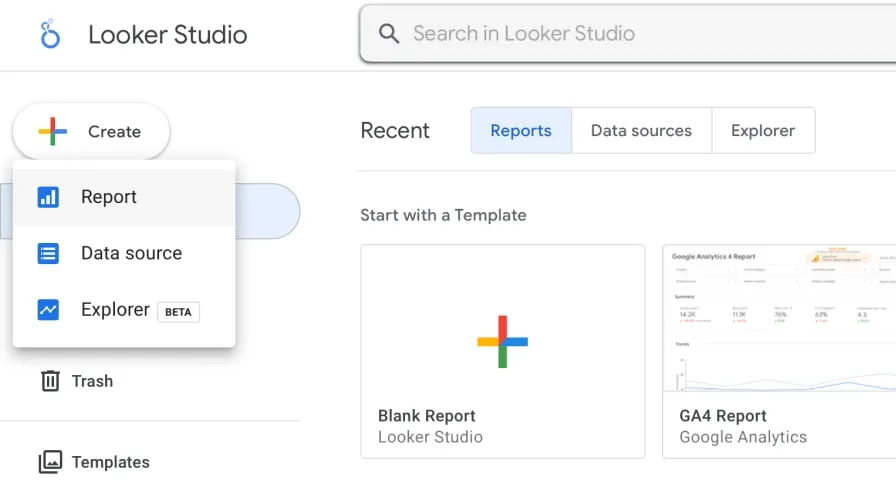
Step 1: Create a blank report in Looker Studio
Go to your Looker Studio account and navigate to the left-hand menu.
Click Create and select Report.
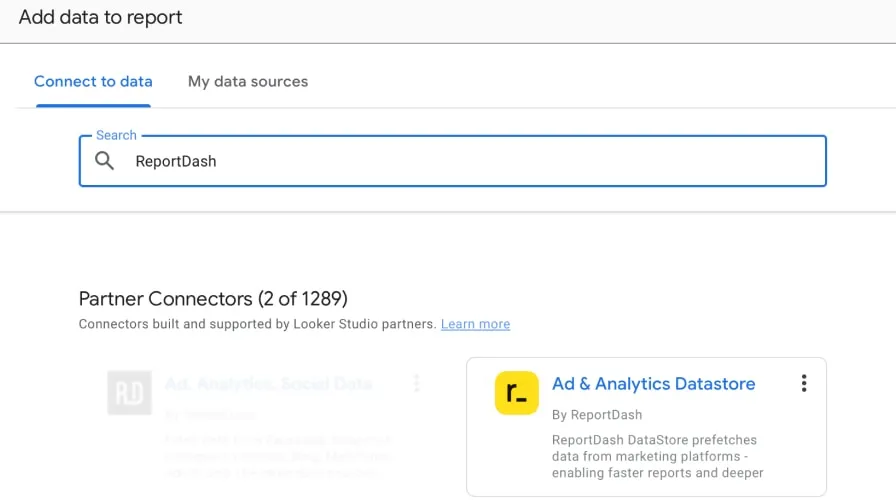
Step 2: Search for ReportDash
In the next step, Search for ReportDash suggested in the Partner connectors. Click on the Ad & Analytics Datastore tile.
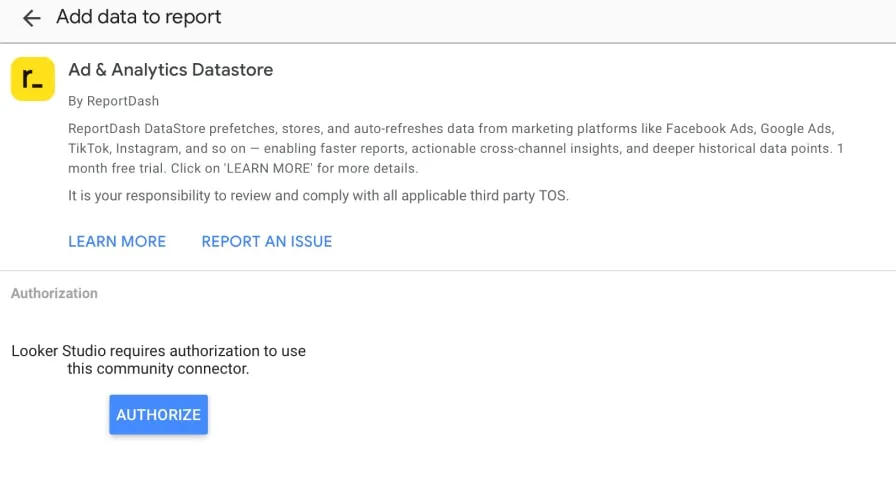
Step 3: Authorize your ReportDash on Looker Studio
Follow the two-step authorization to link your ReportDash account with Looker Studio.
Sign in to Microsoft and grant access to your ad accounts.
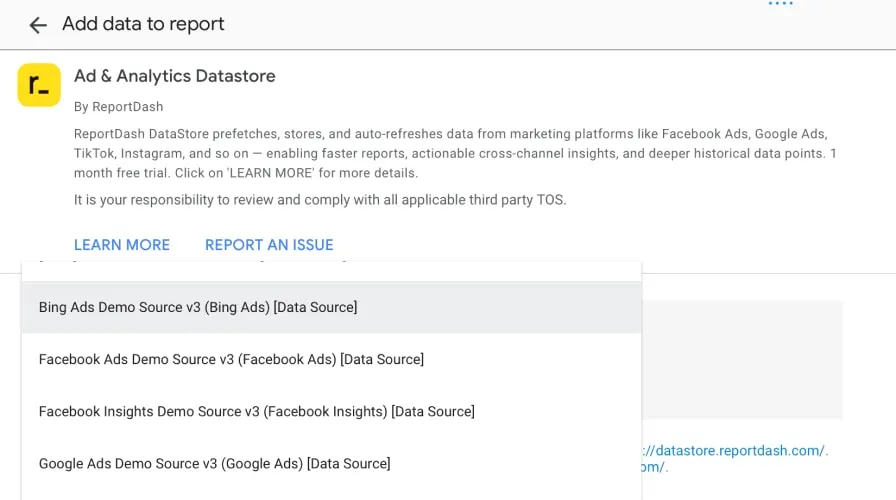
Step 4: Choose your ad account(s)
Next, select the Microsoft Advertising account you want to export data from. Then, press Connect.
Once this is done, you can preview the fields and the types automatically assigned to them. If some of the types are incorrect, you can press the arrow on the right and select another type manually.
Additionally, you can check other settings in the menu on the top, such as community access and field editing.
As for the data freshness settings, the update interval is automatically set to 12hrs or on daily basis.
Step 5: Click Create report
Click Create Report to finish the setup.
Your Microsoft Ads data, including impressions, clicks, spend, and Conversions, will automatically load into Looker Studio
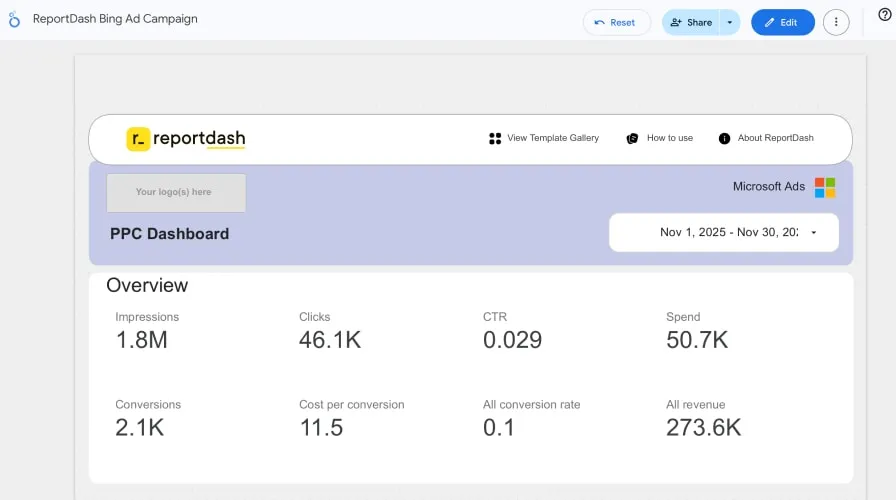
That’s it! You’ve successfully connected Microsoft Ads to Looker Studio, so now you can start visualizing your data.
With ReportDash DataStore, you can extract data from 14+ business apps and load it automatically on a schedule to Looker Studio, Google Sheets, Excel, BigQuery, and Power BI. Among the available data sources, you can find such as Google Ads, GA4, LinkedIn Ads, TikTok, and many others.
Why using ReportDash DataStore to work with Microsoft Advertising
Working with Microsoft Ads data can be complex on looker studio, especially if you are managing multiple accounts or large campaigns. ReportDash DataStore simplifies the process by providing a centralized platform to access, analyze, and report on all your advertising data with ease.
Here are some of the key benefits of using ReportDash DataStore:
Access historical data instantly – Pull past campaign metrics from any supported datastore without delay.
Always work with accurate and complete data – Ensure your dashboards and reports reflect the full picture.
Fast-loading dashboards – Monitor performance in real time without waiting for slow data refreshes.
Create visually appealing reports – Build dashboards and reports that are easy to interpret and share with clients or stakeholders.
Automate reporting – Schedule weekly or monthly reports and send them automatically to your team or clients.
Scale effortlessly – Built to handle large datasets, so growing accounts or multiple campaigns won’t slow you down.
By leveraging these capabilities, marketers and agencies can focus on analyzing results and optimizing campaigns rather than wrestling with data. ReportDash DataStore transforms reporting from a time-consuming task into a seamless, automated process, making it easier to deliver actionable insights to clients and stakeholders.
Conclusion
Connecting Microsoft Ads to Looker Studio doesn’t need to be complicated, time-consuming, or expensive. With ReportDash DataStore, you can centralize all your advertising data in one place, automate updates, and gain instant access to both current and historical metrics. This allows you to spend less time wrestling with data and more time analyzing performance, optimizing campaigns, and delivering actionable insights to your clients.
By using ReportDash, agencies and marketers can:
Reduce manual reporting and eliminate errors from manual uploads
Monitor multiple campaigns and accounts in real time with fast-loading dashboards
Easily create professional, visually appealing reports for clients or internal stakeholders
Automate report delivery on a weekly or monthly schedule, saving hours of work
Scale seamlessly as your campaigns or accounts grow, without performance bottlenecks
Ultimately, ReportDash transforms the way marketers work with data. Instead of struggling with multiple platforms or disconnected spreadsheets, you get a single, reliable source of truth that empowers better decision-making and drives measurable results.
Start today with ReportDash DataStore, connect your Microsoft Ads to Looker Studio in minutes, and unlock the insights that help you optimize campaigns, impress clients, and grow your business.